Contents
- 1 WhatsApp Business vs Regular WhatsApp — What Is the Difference?
- 2 Step 1 — Set Up Your WhatsApp Business Profile the Right Way
- 3 Step 2 — Build a Product Catalogue That Sells While You Sleep
- 4 Step 3 — Set Up Quick Replies for the 10 Questions You Answer Every Day
- 5 Step 4 — Use Away Messages and Greeting Messages to Never Miss a Lead
- 6 Step 5 — Build and Use Broadcast Lists the Smart Way
- 7 Step 6 — Use Labels to Organise Your Customer Pipeline: WhatsApp Business to Grow Your Indian Business
- 8 Step 7 — Generate More WhatsApp Leads From Instagram and Google
- 9 Step 8 — Convert Leads Into Customers Through Smart Follow-Up
- 10 Measuring Your WhatsApp Business Performance
- 11 Frequently Asked Questions
- 11.1 Is WhatsApp Business free to use for Indian businesses?
- 11.2 Can I use WhatsApp Business on two phones?
- 11.3 How many people can I add to a WhatsApp broadcast list?
- 11.4 What is the best time to send WhatsApp broadcast messages to Indian customers?
- 11.5 How do I stop customers from adding me to WhatsApp groups without permission?
- 11.6 Should I use WhatsApp Business or Instagram DMs for customer communication?
- 11.7 Can I accept payments through WhatsApp Business in India?
WhatsApp Business to Grow Your Indian Business: A saree shop owner from Kakinada once told me something that stuck with me. She said, “Anshika, I don’t have money for Instagram ads. I don’t have a website. But every single day, I get 6 to 8 new orders on WhatsApp.” When I asked how, she showed me her WhatsApp Business profile — complete business catalogue, a proper description, quick replies saved for common questions, and a broadcast list of 312 customers she messages every time new stock arrives. She had zero followers on Instagram. Her Google Business Profile had only 11 reviews. But her WhatsApp was a beautifully organised, always-on sales machine — built entirely for free.
That conversation changed how I advise Indian small businesses about digital marketing. WhatsApp Business is not a “nice to have.” For Indian small businesses in 2026, it is the most important free marketing tool available — bar none. With over 500 million active WhatsApp users in India and WhatsApp being the primary communication channel for both personal and business conversations, ignoring it as a marketing channel is simply leaving money on the table every single day.
In this guide, I will show you exactly how to set up WhatsApp Business the right way, use every feature it offers, write messages that convert, and build a system that brings in new customers consistently — without spending a single rupee on advertising.
WhatsApp Business vs Regular WhatsApp — What Is the Difference?
Many Indian business owners use their personal WhatsApp number for business conversations. This works, but it means missing out on a whole set of features specifically designed to make customer communication more professional and more efficient. WhatsApp Business is a separate free app — download it from the Google Play Store or Apple App Store — that gives you everything regular WhatsApp has, plus these additional features.
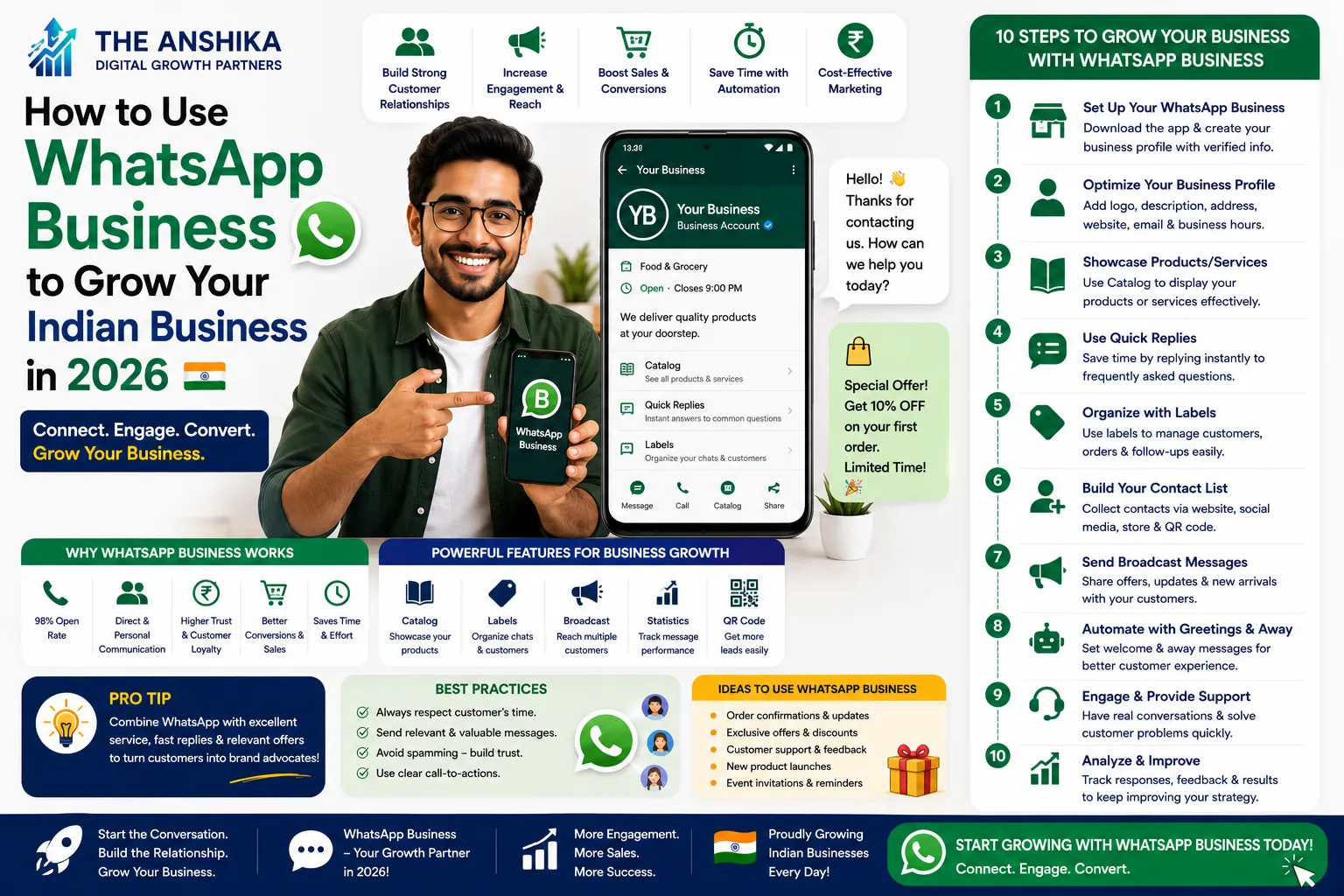
A Business Profile where you can add your shop name, category, address, business hours, email, and website. A Product Catalogue where customers can browse and inquire about your products or services directly inside WhatsApp. Quick Replies — saved message templates you can send with two taps instead of typing the same response every time. Away Messages that go out automatically when you are offline, so customers are never left waiting with no response. Greeting Messages for first-time contacts. Labels to organise your conversations by status — New Customer, Order Pending, Payment Received, Follow Up, and so on. And Broadcast Lists to send one message to up to 256 customers simultaneously as individual private messages.
You can use a different phone number for WhatsApp Business than your personal WhatsApp, or you can migrate your existing personal number to WhatsApp Business — your chat history and contacts move with you. Most Indian business owners prefer to use a dedicated business number for the sake of work-life separation, but either approach works.
Step 1 — Set Up Your WhatsApp Business Profile the Right Way
Your WhatsApp Business profile is often the first impression a potential customer has of your business — especially when they find your number on Google Maps, Instagram bio, or a business card. A complete, professional profile builds immediate trust. An incomplete profile raises doubts.
Open WhatsApp Business and go to Settings → Business Settings → Profile. Fill in every single field. Your business name should match exactly what appears on your Google Business Profile and website — consistency builds trust and helps customers who have searched for you online confirm they have the right contact. Your business category helps WhatsApp understand what you do and may affect how you appear in business directories. Your business description gets 256 characters — use them wisely. Write a clear, benefit-focused description: “Handmade traditional jewellery for weddings and occasions | Custom orders accepted | Based in Kakinada, AP | Delivering across India.” Add your full address including PIN code, your business hours (update these for public holidays and festival seasons), your website URL if you have one, and your email address.
For your profile photo, use your actual shop exterior or your product photo — not a logo alone and not a personal selfie. Indian customers trust businesses they can visualise. A real photo of your shop, your products, or your team creates immediate familiarity and trust that a generic logo cannot.
Step 2 — Build a Product Catalogue That Sells While You Sleep
This is the most underused feature of WhatsApp Business in India, and it is extraordinarily powerful. The WhatsApp Business Catalogue allows you to list your products or services with photos, descriptions, prices, and links — all accessible to your customers directly inside WhatsApp without them needing to visit a website or Instagram page.
To set up your catalogue, go to Settings → Business Settings → Catalogue → Add New Item. For each product or service, add a clear, well-lit photo (use natural window light — see our tips in our article on how to create content for your Indian business on Instagram), a descriptive name, the price, and a brief description that answers the questions a customer would typically ask before buying.
Once your catalogue is set up, anyone who messages you on WhatsApp can browse it like a mini-shop. You can also share individual catalogue items or your full catalogue link in broadcast messages, on Instagram, and on your Google Business Profile. For product-based businesses — clothing, food, jewellery, home décor, electronics — a well-populated catalogue can genuinely replace the need for a full e-commerce website in the early stages of your business.
For service-based businesses — digital marketing, coaching, tailoring, repair services, photography — use the catalogue for your service packages. List each service as an item with a clear description and price range. This reduces the back-and-forth of price inquiries significantly.
Step 3 — Set Up Quick Replies for the 10 Questions You Answer Every Day
Think about the messages you receive on WhatsApp every single day. I guarantee that at least 60% of them are some variation of the same 8 to 10 questions. “What is the price?” “Do you deliver to [city]?” “What sizes do you have?” “How long will it take?” “How do I place an order?” “Do you take custom orders?” “What are your business hours?”
Every time you type a full answer to each of these questions, you are wasting time that could be spent on your actual business. Quick Replies solve this completely. Go to Settings → Business Settings → Quick Replies. Create a saved reply for each of your 10 most common questions. Assign a keyboard shortcut to each — for example, typing “/price” sends your full pricing message, “/delivery” sends your delivery information, “/hours” sends your business hours.
A sample quick reply for a clothing business: “/price → Our salwar suits start from ₹850 and go up to ₹3,200 depending on fabric and design. Silk sarees range from ₹2,500 to ₹18,000. For a specific item, please share the photo or catalogue number and I’ll give you the exact price 😊🙏”
This single feature can save you 45 minutes to an hour every day — and ensure that customers always get a complete, professional answer immediately, even when you are busy with another customer in person.
Step 4 — Use Away Messages and Greeting Messages to Never Miss a Lead
Indian customers who message a business and receive no response within 30 minutes frequently move on to the next option. This is especially true when they find your number through Google Maps or Instagram — they are typically contacting 2 to 3 businesses simultaneously and giving their inquiry to whichever one responds first.
Away Messages solve this by sending an automatic reply whenever someone messages you during your defined “away hours” — typically outside your business hours. Go to Settings → Business Settings → Away Message. Enable it, write your message, and set the schedule to your non-business hours.
A good away message does three things: acknowledges the inquiry immediately, sets a clear expectation for when you will reply, and provides an alternative contact option for urgent matters. Example: “Hello! Thank you for contacting [Business Name] 🙏 We have received your message and will reply within 2 hours during business hours (10 AM to 8 PM, Monday to Saturday). For urgent orders or queries, please call us at [number]. We look forward to helping you!”
Greeting Messages work similarly but go out automatically to anyone who messages you for the first time, or after 14 days of inactivity in a conversation. Set up a greeting message that introduces your business, mentions your catalogue link, and invites the customer to share their inquiry. This ensures that even if you are with a customer in person when someone new messages, they immediately receive a professional, warm welcome.
Step 5 — Build and Use Broadcast Lists the Smart Way
WhatsApp Broadcast is one of the most powerful features for Indian business marketing — and one of the most misunderstood. A broadcast list allows you to send one message to up to 256 contacts simultaneously. Crucially, each recipient receives the message as an individual private message — not in a group. This means it feels personal, not like a mass SMS blast.
However, there is an important limitation: your broadcast message will only be delivered to recipients who have your number saved in their contacts. This is why you must make it a habit to ask every customer to save your number — and give them a reason to. “Please save our number so you don’t miss our new arrivals and special offers!” is all you need to say.
The most effective use of broadcast lists for Indian businesses is segmentation. Do not send every message to every customer. Create separate broadcast lists for different customer segments. For a clothing business: a list for customers who buy sarees, a list for customers who buy salwar suits, a list for wholesale buyers, and a list for customers who have inquired but not yet purchased. Sending saree arrival updates only to your saree customers — rather than everyone on your list — results in much higher response rates and fewer people asking to be removed from your list.
The content of your broadcast messages matters enormously. The single most important rule: always lead with value, never lead with a hard sell. Instead of “NEW STOCK ARRIVED BUY NOW”, try: “Hello [Name] 🙏 Hope you are having a good week! We just received beautiful new Kanjivaram silk sarees in 8 colours — I thought of you because you had mentioned you wanted a silk saree for your daughter’s engagement. Shall I send you some photos? We can also arrange a video call if you’d like to see the colours clearly 😊”
This message is personal, it references a previous conversation, it leads with helpfulness rather than a sales pitch, and it invites a response rather than just broadcasting information. This approach converts at 3 to 4 times the rate of generic promotional broadcasts.
Step 6 — Use Labels to Organise Your Customer Pipeline: WhatsApp Business to Grow Your Indian Business
As your WhatsApp Business grows, keeping track of where each conversation is — who is a new inquiry, who is waiting for a payment, who is a repeat customer you want to nurture — becomes challenging. Labels are the solution.
Tap and hold any conversation, then tap the label icon to assign one or more labels. Suggested labels for Indian small businesses: New Inquiry (first message, not yet qualified), Interested (they want something but haven’t ordered), Order Confirmed (order placed, payment pending or received), Shipped (product dispatched, tracking shared), Repeat Customer (has bought from you before), VIP (high-value customer who deserves extra attention), and Follow Up (contacted once, no response, needs a gentle follow-up).
Once labelled, you can view all conversations under a specific label by tapping it in the Chats screen. This gives you an instant pipeline view — you can see at a glance how many new inquiries you have today, how many orders are pending, and which customers need a follow-up call. This simple system has helped many Indian business owners reduce the number of orders that fall through the cracks by 70% to 80%.
Step 7 — Generate More WhatsApp Leads From Instagram and Google
Your WhatsApp Business number is only useful if potential customers know it exists and feel comfortable messaging you. Here is how to drive more leads to WhatsApp from the other channels your customers already use.
Create a WhatsApp direct link using this format: https://wa.me/91XXXXXXXXXX (replace XXXXXXXXXX with your 10-digit Indian mobile number, preceded by 91 for the country code). This link opens a chat with your business directly when tapped — no need for the customer to save your number first. Place this link in your Instagram bio, your Google Business Profile website field, your website’s header and contact page, and your Facebook page. For a detailed guide on optimising your Instagram profile to drive more of these leads, read our article on how to get local customers on Instagram without Reels or ads.
Create a WhatsApp QR code — available in WhatsApp Business under Settings → Business Settings → Short Link — and print it on your business cards, packaging, receipts, and shop signage. A simple sign near your billing counter saying “Scan to message us on WhatsApp for offers and updates 🙏” is all you need. Many Indian customers prefer scanning a QR code to manually typing a number.
On your Google Business Profile, add your WhatsApp number as a phone contact and enable the messaging feature if available in your region. Customers who find you on Google Maps can then message you directly without visiting your website. This is particularly powerful for service businesses — plumbers, repair shops, tailors, coaching centres — where the customer’s first question is always about availability and pricing.
Step 8 — Convert Leads Into Customers Through Smart Follow-Up
The biggest money leak in Indian WhatsApp business conversations is poor follow-up. A customer messages asking about your product, you respond, they go quiet — and you never contact them again. In most cases, that customer was genuinely interested but got distracted, needed to discuss it with their family, or was waiting for their salary to credit. A well-timed, well-worded follow-up message converts many of these “ghosts” into paying customers.
Here is a simple 3-message follow-up sequence that works for Indian customers. Day 2 (if no response): “Hi [Name] 😊 Just checking if you received my message about [product/service]. Happy to answer any questions — no rush at all!” This is gentle, non-pushy, and acknowledges that life gets busy. Day 4 (if still no response): Share something new and genuinely useful — a photo of a new arrival, a positive customer review, or a relevant tip. Keep it conversational: “Hi [Name], thought you might like to see this — we just got [new product] and it’s going quickly this week. Let me know if you’d like more details 😊” Day 7 (final follow-up): “Hi [Name], I know you’re busy! Just wanted to mention that our current offer on [product/service] ends this Sunday. No pressure at all — we’ll be here whenever the time is right. 🙏”
After the 7-day sequence with no response, move the contact to a general broadcast list for occasional updates but stop individual follow-ups. Respect is a cornerstone of Indian business culture — persistent following up beyond this point damages your reputation rather than winning the sale.
Measuring Your WhatsApp Business Performance
WhatsApp Business provides basic statistics for broadcast messages — number of messages sent, delivered, and read. Go to any broadcast list message and tap the info icon to see these numbers. A read rate above 60% on broadcasts is healthy for Indian businesses. Below 40% usually means either your contacts haven’t saved your number (so the message isn’t being delivered) or your content is not compelling enough to open.
For a broader view of your digital marketing performance including traffic from WhatsApp links to your website, set up Google Analytics 4 on your website. Direct traffic in GA4 includes clicks from WhatsApp links, so you can track how many website visits your WhatsApp marketing generates. For a complete guide on setting this up, read our article on how to use Google Analytics for your Indian website.
Frequently Asked Questions
Is WhatsApp Business free to use for Indian businesses?
Yes, WhatsApp Business is completely free to download and use. All the features described in this article — business profile, catalogue, quick replies, broadcast lists, away messages, labels — are available at zero cost. The only paid version is WhatsApp Business API, which is for large enterprises that need to send automated messages to thousands of customers simultaneously through a third-party platform. For the vast majority of Indian small businesses, the free WhatsApp Business app is more than sufficient.
Can I use WhatsApp Business on two phones?
WhatsApp now supports up to 4 linked devices for a single account — one primary phone and up to 3 additional devices (including other phones, tablets, or computers using WhatsApp Web). This is useful if you have a shop assistant or family member who also needs to respond to customer messages. Go to Settings → Linked Devices to set this up. However, all devices share the same account — there is currently no built-in way to have multiple staff members operating separate accounts under one business number.
How many people can I add to a WhatsApp broadcast list?
Each broadcast list can have up to 256 contacts. However, you can create multiple broadcast lists — for example, one for saree customers, one for suit customers, one for wholesale buyers. There is no limit on the number of broadcast lists you can create. Remember that your message will only be delivered to recipients who have your number saved in their contacts, so always ask customers to save your number when you first interact with them.
What is the best time to send WhatsApp broadcast messages to Indian customers?
Based on open rate data across Indian businesses I have worked with, the best times to send WhatsApp broadcasts to Indian consumers are: 8:00 AM to 9:30 AM (before work begins), 1:00 PM to 2:30 PM (lunch break), and 8:00 PM to 10:00 PM (after dinner, relaxation time). Avoid sending broadcasts between 11 PM and 7 AM — messages sent during sleep hours often go unread and create a cluttered inbox experience. For B2B customers and working professionals, 10:00 AM to 11:30 AM on weekdays tends to get the highest open rates.
How do I stop customers from adding me to WhatsApp groups without permission?
This is a very common issue for Indian business owners whose numbers are widely circulated. Go to Settings → Privacy → Groups → and change this setting to “My Contacts” or “My Contacts Except…” to control who can add you to groups. This prevents random people from adding your business number to unrelated groups, which is both unprofessional and a potential spam risk.
Should I use WhatsApp Business or Instagram DMs for customer communication?
Both have their place, but WhatsApp Business is significantly better for actual sales conversations and customer service in the Indian market. WhatsApp messages have a much higher open and response rate than Instagram DMs — because WhatsApp is a communication-first platform where people check messages frequently, while Instagram DMs can be easily missed among notifications. Use Instagram DMs for initial inquiries that come through your Instagram content, then move the conversation to WhatsApp as quickly as possible for follow-up, order details, and payment. Having both channels connected — your Instagram bio links to your WhatsApp, your WhatsApp profile links back to your Instagram — creates a seamless customer journey.
Can I accept payments through WhatsApp Business in India?
Yes — WhatsApp Pay is available in India and allows you to send and receive UPI-based payments directly within WhatsApp conversations. To enable it, go to Settings → Payments → Add Payment Method and link your bank account via UPI. This allows customers to pay you without leaving WhatsApp, which reduces friction significantly in the checkout process. Many Indian customers who are comfortable with UPI payments find this extremely convenient. Note that WhatsApp Pay requires both you and the customer to have it set up, so it works as an additional payment option rather than a replacement for your existing payment methods.
WhatsApp Business is not complicated. It does not require technical expertise, a large budget, or hours of daily management. What it requires is consistency — keeping your profile updated, responding promptly, sending genuinely useful broadcast messages regularly, and following up with leads systematically. The saree shop owner from Kakinada I mentioned at the beginning of this article gets 6 to 8 orders per day with 312 contacts on her broadcast list. That is entirely achievable for your business too — and it starts with downloading WhatsApp Business and filling in your profile properly today. If you need help setting up your WhatsApp Business strategy or want us to review your current setup, write to us at support@theanshika.in and we will guide you through it personally.